Stream vinyl and CDs directly to
HomePods and AirPlay speakers.
No subscriptions. No cloud accounts.
No old iPad left running.
Just press play.
“Works perfectly – audio plays in stereo through HomePods, Home app volume slider stays in sync.” — autostream user, GitHub
Free for Personal Use
autostream…
- Turns any Raspberry Pi into an AirPlay/AirPlay2 streamer.
- Automatically starts streaming when sound is detected and stops when it ends. It preserves the simplicity of Hi-Fi separates whilst playing through multi-room Wi-Fi speakers.
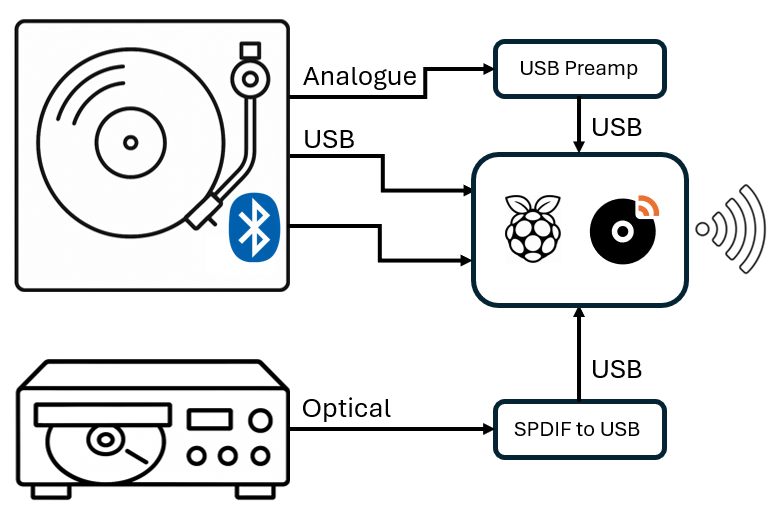
- Works with analogue, USB and Bluetooth turntables and can be used with two devices together, such as a turntable and a CD player.
- Has a simple, mobile optimised interface to control volume and which speakers are playing.
- Works entirely on your home network.
- Provides a per-input equaliser.
- Tracks turntable stylus hours and provides a notification when it needs changing.
autostream works as a dedicated appliance — a Raspberry Pi in a case, connected to your turntable, tucked out of sight — or can be embedded physically inside most Hi-Fi gear including CD players, turntables, and tape decks, creating a single-power-cord streaming device with nothing visible.
Getting Started
Getting started with autostream is easy. All you need is a Raspberry Pi and a USB turntable, or a USB adapter like the Behringer UFO202 with a standard turntable.
Then install the software with one command.
Web App
The autostream web app provides easy access to volume control and speaker selection.
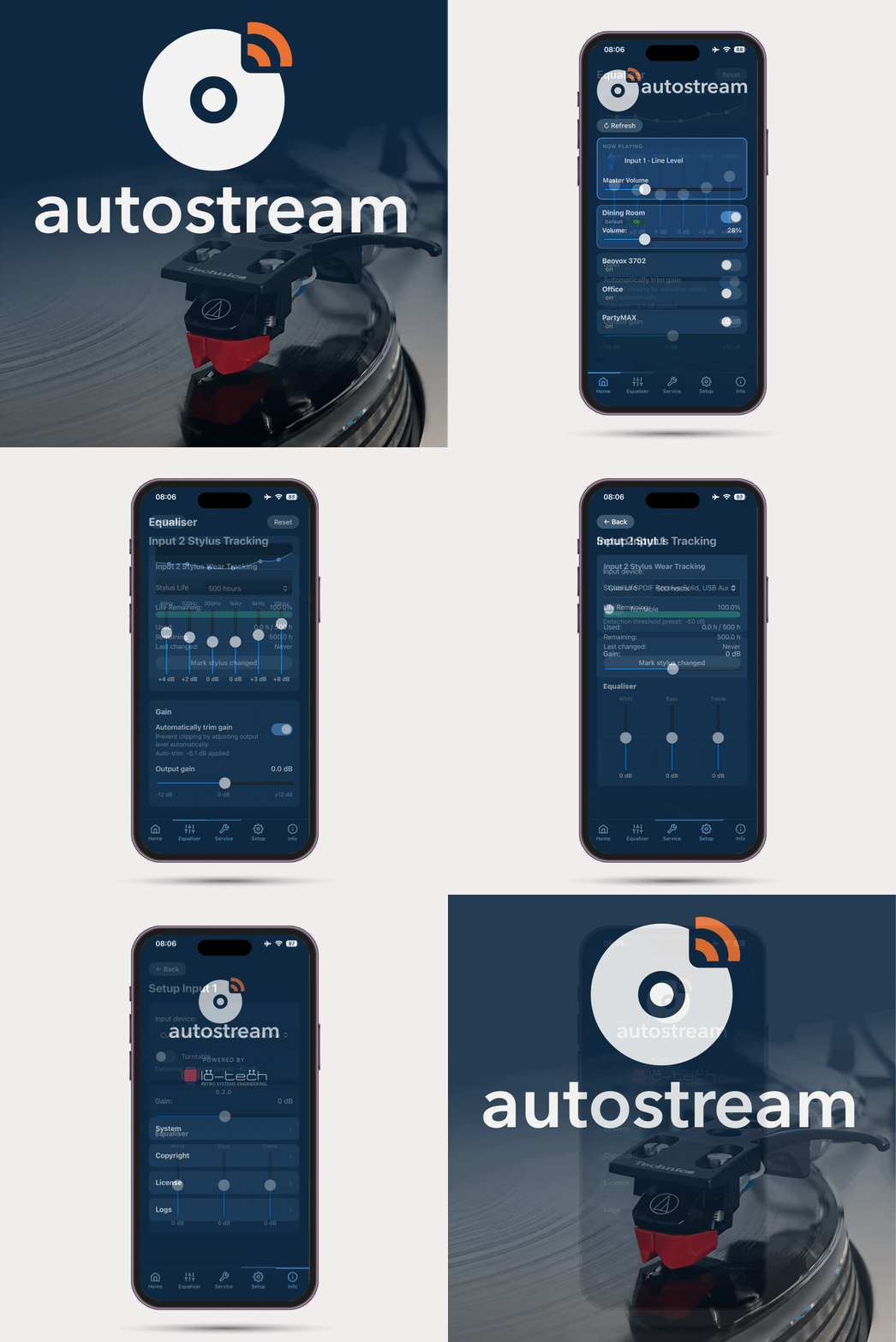
It can be added to an iPhone home screen and behaves much like a regular app, without needing to install anything.
Use Cases
- Vinyl enthusiasts: Play your records directly to AirPlay speakers and Apple TV.
- Minimalist Hi-Fi: A record player (or other source) and wireless speakers is all that’s on view. No amplifier, no trailing speaker wires, no limits on speaker placement.
- Multi-Room Hi-Fi: Enjoy your records and CDs throughout the house.
- Embed autostream right into retro/vintage Hi-Fi: create your own fully integrated, single-power cord AirPlay Turntable like this or CD player like this one.
- Use a Bluetooth turntable with AirPlay speakers, including HomePods.
This isn’t another “stream from your phone” hack. It’s real-time analogue to AirPlay audio.
autostream FAQ
- Can I play my turntable through a HomePod?
Yes — that’s exactly what autostream is designed for. Connect your turntable to a Raspberry Pi running autostream, and it will stream the audio to any HomePod, HomePod mini, or other AirPlay speaker on your home network. The moment the needle drops, music plays through your speakers automatically.
- Do I need an Apple device to use autostream?
autostream works best with Apple speakers but should also work with other AirPlay or AirPlay 2 speakers like Sonos, Denon, Edifier, Up2Stream, and many others.
- Does my turntable need to have a USB output?
Not necessarily. Turntables with a built-in USB output can be connected directly to the Raspberry Pi. For turntables with a standard phono or line output, you’ll need a low-cost USB audio adapter such as the Behringer UFO202 (around £20). CD players and other optical outputs can connect via an inexpensive SPDIF-to-USB dongle. For tape decks and other analogue sources, using a USB line card (the Behringer UFO202 can do that too).
- Does autostream work with popular USB turntables like the Audio-Technica LP60XUSB or LP120XBTUSB?
Yes — both connect directly to the Raspberry Pi via USB with no additional hardware needed. autostream detects the audio automatically, so the moment the needle drops, music plays through your AirPlay speakers. Most USB turntables work the same way; if your turntable has a USB output, it will almost certainly work with autostream.
- What is a Raspberry Pi, and do I need to be technical to set this up?
A Raspberry Pi is a tiny, low-cost computer roughly the size of a credit card — a Pi Zero 2W costs around £15. You don’t need to be a programmer to use autostream: the installer is a single command that does everything automatically. You’ll need to image a microSD card (using Windows or MacOS to run the Raspberry Pi Imager) and the connect to the Pi using SSH and run one command which can be copy/pasted from the Github page.
- Is it difficult to update?
Not at all. autostream includes a built-in update function accessible directly from the web app — no command line required.
- Does it work with AirPlay 2 multi-room audio?
Yes. autostream can stream your vinyl or CD to multiple rooms simultaneously — kitchen, living room, and bedroom all at the same time, for example. For best results, use a single speaker brand (e.g., Apple).
- Does it support Stereo HomePods?
Yes. If you have two HomePods configured as a stereo pair in the Home app, autostream sees them as a single stereo output and streams to them just as it would any other AirPlay speaker. Your vinyl or CD plays in proper left/right stereo through the pair. This also works when a stereo HomePod pair is configured as the audio output for an Apple TV — see below.
- Does autostream support Apple TV?
Yes. Apple TV appears as an AirPlay target on your network, so autostream can stream directly to it. This is particularly useful when your Apple TV is configured to output audio to a HomePod or stereo HomePod pair — autostream will stream through the Apple TV to those speakers, giving you another flexible path to getting your turntable or CD player playing through your HomePod setup.
- Is this like mirroring my phone's audio to a HomePod?
No — autostream streams directly from your turntable or CD player to your AirPlay compatible speakers. Your phone isn’t involved at all. The audio goes straight from your Hi-Fi source to your speakers; there’s nothing to tap, no app to keep open, and no Bluetooth pairing. The autostream web app provides control of the volume, which speakers are playing, and other settings and can be accessed on iPhone, Android, MacOS or PC.
- Does it start and stop automatically?
Yes. autostream listens for audio on your connected sources. When it detects music playing — a record spinning, a CD starting — it begins streaming automatically, playing on the speakers that have been chosen as ‘default’ at the similarly chosen ‘default’ volume (e.g., 20%). When the music stops, it stops. There’s nothing to press and it preserves the user-experience of the vintage Hi-Fi gear.
- Can I use two sources at once — a turntable and a CD player, for example?
Yes. autostream supports two simultaneous audio inputs and switches between them automatically based on which one is playing.
- Can I adjust the sound?
Yes. autostream includes two equaliser stages. Each input has a three-band EQ — useful for correcting the typically weak bass or treble from older Hi-Fi sources. A separate six-band output EQ lets you tune the overall tone to your speakers. Both are accessible from the web app.
- What is the Stylus Tracking function?
autostream tracks playback hours for each input and uses this to manage turntable maintenance reminders — including stylus replacement, belt replacement, and oiling. Reminders can be triggered by hours of use, time since last maintenance, or both, with thresholds configured in the web app. When a threshold is approaching — for example, 495 hours against a 500-hour stylus life — a reminder appears in the web app.
- Can I prevent other users changing the settings?
Yes. The settings page is PIN protected. The PIN is set during installation and can be changed at any time from the web app.
- Does it require a subscription, cloud account, or internet connection?
None of the above. autostream runs entirely on your local home network using a low-cost Raspberry Pi. There are no accounts to create, no subscriptions, no adverts, and no dependency on any external service. It will keep working even if lo-tech disappears!
- Can I embed autostream inside a turntable or HiFi component?
Yes! Using Raspberry Pi Zero 2W, it can be fitted inside many turntables and CD players, creating a single-power-cord streaming appliance with no external box. See this worked example with a vintage CD player and this Technics turntable build.
- How much does autostream cost?
autostream is free for personal, non-commercial use. The hardware you’ll need (Raspberry Pi + USB audio adapter) costs roughly £35–£50 in total.
- Where do I get help or report a problem?
The autostream Discussions page on GitHub is the place to ask questions, share feedback, and discuss feature ideas. Bug reports and issues can be filed in the issue tracker.
- What powers the AirPlay streaming under the hood?
autostream uses OwnTone as its AirPlay streaming engine. OwnTone is a mature, open-source media server with excellent AirPlay 2 support, and autostream installs and manages it automatically — you never need to interact with it directly. We’re grateful to the OwnTone contributors for their work.
- What ecosystems does autostream support?
autostream is an independent product from Lo-tech Systems Limited designed for AirPlay audio streaming using Owntone. It works with a wide range of AirPlay-compatible speakers, including HomePod and HomePod mini, Apple TV, and many third-party products.
autostream is not affiliated with, endorsed by, or sponsored by Apple Inc. HomePod, HomePod mini, AirPlay, AirPlay 2, and Apple TV are trademarks of Apple Inc.